How the Channel Manager Works — From Signup to Synced OTAs
One central inventory, live connections to every OTA, and a guided setup an Indian homestay owner can finish without a technician. Here is exactly what happens at each step — including the honest parts.
Want the product tour instead? See the Channel Manager overview or the full feature breakdown.
One Inventory, Many Channels
A channel manager works by keeping a single central record of your rooms, rates and availability, and syncing it in real time with every OTA through live API connections. Your property exists once, in one place. MakeMyTrip, Goibibo, Booking.com, Agoda, Airbnb and your own direct booking website are all windows into that same record — not separate copies that drift apart.
That single-source design is what makes double bookings structurally impossible: when a guest books a room anywhere, that room is removed from the shared pool and every other channel is corrected within moments. Real-time OTA sync works in both directions — bookings flow in, rate changes flow out. Compare that with managing five extranets by hand, or with free iCal sync, which only shares availability and can lag by hours.
Live on Every Channel in 4 Steps
What each step involves, and how long it really takes
Set Up Your Property
Minutes
Add your property name, location and details — or use your existing MyHomestay.ai property if you already run the PMS. This becomes the single source of truth every OTA syncs against.
Sync Your Rooms
Minutes
Create your room types once — Deluxe Room, Family Suite, Whole Villa — with base rates and occupancy. These are the rooms you will map to each OTA listing in the next step.
Connect Your OTAs
A few minutes per channel + OTA approval
Pick a channel from the marketplace and follow the guided setup: authorise MyHomestay.ai in that OTA's own extranet, then map each OTA listing to the right room type. Clear instructions show exactly what to fetch from your OTA account — no technical knowledge needed.
Go Live & Monitor
Ongoing, automatic
Once a channel is approved and mapped, sync is automatic. Watch connection health, last-sync time and bookings roll into one feed — and manage rates for every channel from one calendar.
The Channel Marketplace — Guided OTA Connections
Every supported OTA in one place, each with a step-by-step connection flow and a get-listed guide if you are not on that platform yet.
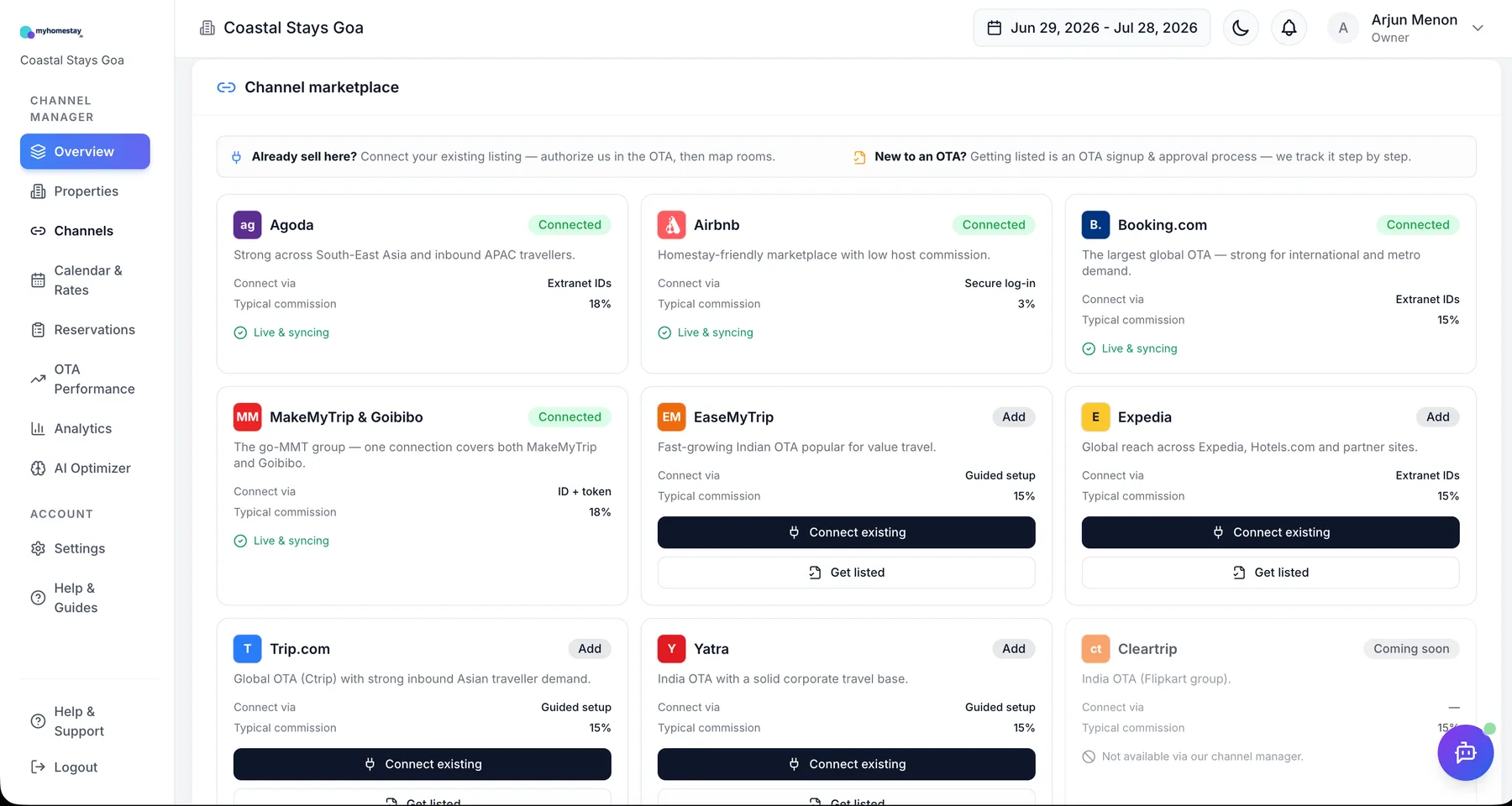
The channel marketplace — connect the OTAs you already sell on, shown with sample data.
How Each OTA Connection Works
Every platform authorises connectivity partners a little differently. Here is what to expect, channel by channel.
MakeMyTrip & Goibibo
Both run on the shared inGo-MMT extranet, so one connection covers India's two biggest domestic OTAs. You authorise the connection from your inGo-MMT account, map rooms once, and both platforms stay in sync.
Booking.com
Connected through Booking.com's official connectivity programme. You select MyHomestay.ai as your provider inside the Booking.com extranet, approve the connection, and map your listings to room types.
Agoda
Linked via Agoda's YCS extranet. Strong for South-East Asian and APAC inbound travellers — a growing segment for Indian coastal and metro properties.
Airbnb
Full API connection — availability, rates and reservations, not just an iCal calendar feed. Ideal for homestays and villas where Airbnb drives discovery.
Expedia
One connection covers Expedia, Hotels.com and partner sites. Useful for international inbound guests booking India trips from the US and Europe.
Trip.com, Yatra & EaseMyTrip
Round out domestic and Asian demand: Yatra's corporate travel base, EaseMyTrip's value travellers and Trip.com's inbound Asian market. Cleartrip support is coming soon.
What Happens When…
The two flows that run your distribution, end to end
…a booking comes in
- 1Guest books your Deluxe Room on MakeMyTrip for 14–16 December
- 2The booking lands in your consolidated reservations feed within moments — source, guest, dates, amount
- 3Availability for those dates updates on Goibibo, Booking.com, Agoda, Airbnb and your direct website automatically
- 4Your analytics update: channel mix, net revenue after MakeMyTrip's commission, booking pace
…you change a rate
- 1You raise the Christmas-week rate from ₹4,500 to ₹6,000 in the calendar — one edit, all rooms
- 2The new rate pushes to every connected OTA within moments
- 3Minimum-stay or stop-sell restrictions you set travel with it, per channel
- 4The AI Revenue Optimizer re-evaluates and flags the next underpriced window
Then You Just Watch One Window
Connection health, reservations, net revenue and channel mix — the daily view that replaces logging in to five extranets every morning.
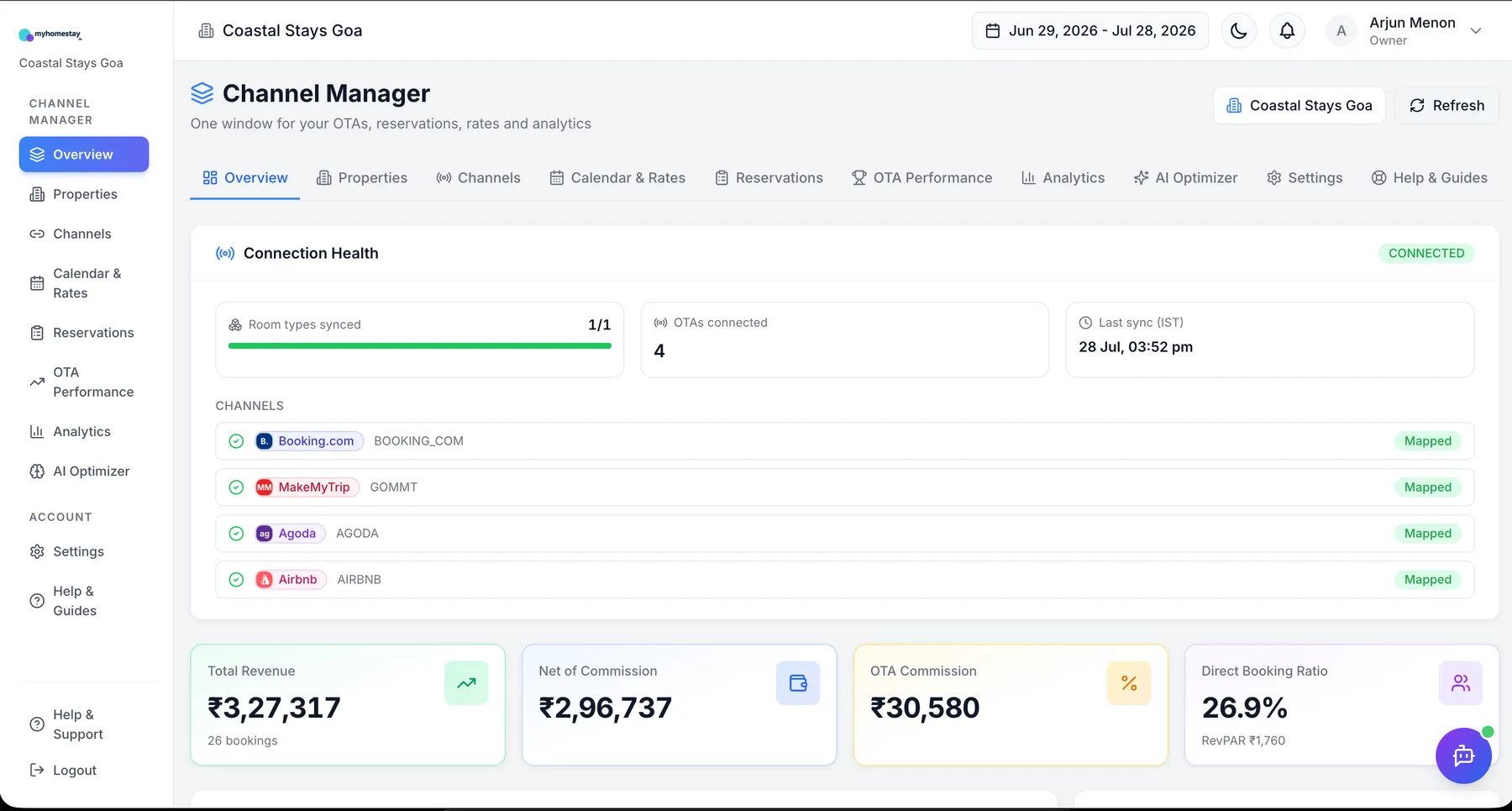
The honest bit: connecting an OTA needs you to authorise us inside that OTA's own account, and OTA approval can take from hours to a few days per platform. We can't create a brand-new OTA listing for you — but our get-listed guides show you exactly how, and we take over the moment your listing is live.
Setup & Sync FAQs
Ready to Go From Extranets to One Window?
Express your interest — we'll map out your channels, walk you through setup, and get you live within the week.
How Channel Manager Setup Really Works for Indian Properties
Understanding how a channel manager works removes the fear of switching from manual extranet management. MyHomestay.ai keeps one central inventory for your homestay, villa, guest house or small hotel, and connects it to MakeMyTrip & Goibibo (one inGo-MMT connection covers both), Booking.com, Agoda, Airbnb, Expedia, Trip.com, Yatra and EaseMyTrip through live, two-way API sync. Setup is a guided four-step flow — property, rooms, connections, go-live — that most Indian owners complete within the first week, with OTA-side approval being the only wait. From then on, every booking updates every channel automatically, every rate change pushes everywhere at once, and your day starts with one dashboard instead of five extranet logins.
Related Topics
Your Homestay is in Good Hands
Powered by industry-leading technology